Product
Submissions & workflows
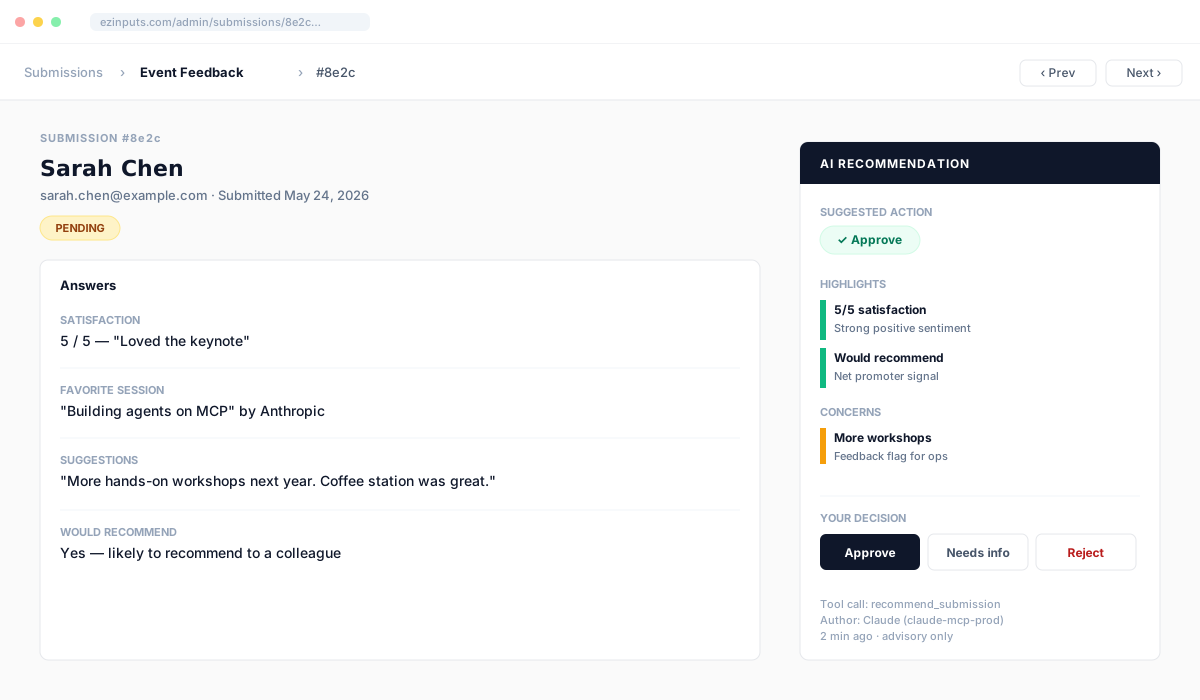
Every submission lands in a tenant-scoped review queue with a full audit trail. AI can soft-approve in bulk — but only humans change status.
Workflow lifecycle
Submitted
Hits the queue
Pending
Awaiting review
AI signal
aiReview (advisory)
Human
Approved or rejected
Status set
AI soft-approval signals
highlights[]
Things the AI noticed are good — quoted from the submission.
concerns[]
Things worth a closer look. Each links back to the source field.
fieldsReferenced[]
Field IDs the AI quoted — the UI resolves these to labels.
suggestedAction
Recommended next step: approve, reject, or needs-info.
What AI does
Writes the aiReview advisory field. Annotates concerns and highlights. Surfaces a suggested next action.
What AI never does
Change workflow status without an HMAC confirmation token. Bulk-approve > 25 records without explicit human confirm.
Triaging via Claude
See MCP overview for the full submission tool catalog and audit-log details.